This is an example of a HTML caption with a link.

update NAV & NIS 2011

2 komentar


Hai sobat blogger semua! kali ini saya menerbitkan kembali posting lama saya tentang NIS & NAV update atau yang lebih sering kita sebut update_an Norton. Tapi ada yang baru, apa itu? Jawabannya adalah link download yang saya sediakan. Semoga semakin bermanfaat buat temen-temen semua.

Norton Internet Security (NIS) dan Norton Anti Virus (NAV) termasuk dalam Anti virus terbaik dunia. Ketelitian dalam mendeteksi dan mendiagnosa virus adalah andalan dari kedua produk Symantec ini. Tapi jangan lupa, yang terpenting adalah ketajaman dari vaksin yang diproduksi.

The KMPlayer (Terjemahan dari The Perfect Payer, The KMPlayer)

0 komentar


Satu lagi informasi gratis untuk Anda semua. Kali ini saya akan memberikan sedikit ulasan tentang media player yang disukai user dengan kelebihan-kelebihannya yang sangat menarik. Saya harap ini berguna bagi kita semua.


KMPlayer adalah audio/video player yang mendukung banyak codec dan format file, seperti VCD, DVD, AVI, MPEG-1/2/4, WMV, RealMedia, QuickTime dan juga beberapa format file lainnya. KMPlayer juga memungkinkan Anda untuk menangkap screenshot pada video saat sedang diputar.

Tampilan KMPlayer juga menarik dan mudah untuk diatur. Pemutaran Video KMPlayer sangat mudah, untuk memproses berbagai pilihan yang tersedia yang memungkinkan Anda untuk mempertajam, mengubah properti gambar, menerapkan penyaring dan beberapa fitur lainnya.
Saya pikir kita harus memiliki KMPlayer di PC kita yang dapat diberikan kemampuan untuk menjalankan format file begitu banyak. Jadi kita tidak perlu lagi menginstal codec untuk memutar banyak beberapa format file audio / video.

Beberapa kelebihan dari KMPlayer:
      * Freeware, Gratis
      * Memiliki kualitas audio yang baik dan video output, di atas standar atau iTunes winamp
      * Bukan hanya mp3 player, tetapi merupakan pemutar multimedia yang lengkap. Dapat memainkan file dvd dan video dengan benar
      * Memiliki codec yang banyak, sehingga kita tidak lagi memerlukan banyak perangkat lunak untuk memutar jenis file sharing (bahkan bermain swf).
      * Ada skin lucu & keren pilihan yang dapat didownload secara terpisah
      * Banyak penyesuaian, mulai dari filter yang akan digunakan untuk pilihan gambar pada player yang digunakan.
Jadi tunggu apa lagi. Silahkan download di link di bawah ini:

Download KMPlayer 2.9.4.1436

LAN & WAN (Terjemahan posting sebelumnya)

0 komentar

Adsense Indonesia
1. LAN


Apa itu LAN? Anda pasti sering mendengar istilah itu. Mungkin beberapa dari kalian sudah tahu tentang LAN. Tapi aku yakin ada beberapa dari kalian yang tidak tahu tentang LAN.
Local Area Network (LAN) adalah jaringan komputer yang jaringannya hanya mencakup area kecil, seperti jaringan komputer kampus, gedung, kantor, di rumah, sekolah atau yang lebih kecil. Saat ini LAN, sebagian besar didasarkan pada teknologi IEEE 802.3 Ethernet menggunakan perangkat switch, yang memiliki kecepatan transfer data 10, 100, atau 1000 Mbit / s. Selain teknologi Ethernet, teknologi saat ini, 802.11b (sering disebut Wi-fi) juga sering digunakan untuk membentuk LAN. Tempat-tempat yang menyediakan koneksi LAN dengan teknologi yang disebut Wi-Fi hotspot.
Pada LAN, setiap node atau komputer mempunyai daya komputasi sendiri, berbeda dengan konsep dump terminal. Setiap komputer juga dapat mengakses sumber daya di LAN sesuai dengan hak akses yang telah diatur. Sumber dapat berupa data atau perangkat seperti printer. Pada LAN, seorang pengguna juga dapat berkomunikasi dengan pengguna lainnya dengan menggunakan aplikasi yang sesuai.
Berbeda dengan Wide Area Network atau Wide Area Network (WAN), maka LAN mempunyai karakteristik sebagai berikut:

    
1. Transfer data yang cepat/tinggi
    
2. Meliputi wilayah geografis yang sempit
    
3. Tidak memerlukan jaringan telekomunikasi yang disewa dari operator telekomunikasi
Biasanya salah satu komputer di jaringan komputer akan digunakan dalam server yang mengatur semua sistem dalam jaringan.


2. WAN

WAN adalah singkatan dari istilah teknologi informasi dalam bahasa Inggris: Wide Area Network adalah jaringan komputer yang mencakup area yang besar sebagai contoh dari suatu jaringan komputer antar wilayah, kota atau bahkan negara, atau dapat didefinisikan juga sebagai jaringan komputer yang membutuhkan router dan saluran komunikasi publik.

WAN digunakan untuk menghubungkan jaringan lokal dengan satu jaringan lokal lainnya, sehingga pengguna atau komputer di satu lokasi dapat berkomunikasi dengan pengguna dan komputer di lokasi lain.

Sumber: http://happy-network.net46.net/definition.html
              http://id.wikipedia.org/wiki/WAN

LAN & WAN

0 komentar

Adsense Indonesia
1. LAN


What is LAN? You'll often hear the term. Maybe some of you already know about the LAN. But I'm sure there are some of you who do not know about the LAN.
Local Area Network (LAN) is a computer network whose network only covers a small area, such as campus computer networks, buildings, offices, in homes, schools or smaller. Today, most LAN based on IEEE 802.3 Ethernet technologies using a switch device, which has a data transfer speed 10, 100, or 1000 Mbit / s. In addition to Ethernet technology, current technology, 802.11b (often called Wi-fi) is also often used to form a LAN. Places that provide a LAN connection with a technology called Wi-Fi hotspots.
On a LAN, each node or computer has the computing power of its own, different from the concept of terminal dump. Each computer can also access resources on the LAN in accordance with the access rights that have been arranged. Resources can be data or devices such as printers. On a LAN, a user can also communicate with other users by using the appropriate application.
In contrast to Wide Area Network or Wide Area Network (WAN), the LAN has the following characteristics:

    1. Having rapidly higher data
    2. Covering a narrower geographical area
    3. Does not require leased telecommunication lines from telecom operators

Usually one of the computers on the network computer will be used in a server that manages all systems in the network.

2. WAN


WAN is short for the term information technology in English: Wide Area Network is a computer network covering a large area as an example of a computer network between regions, cities or even countries, or can be defined as well as computer networks that require routers and public communication channels.

WANs are used to connect a local network with one other local network, so users or computers in one location can communicate with users and computers in other locations.

Source: http://happy-network.net46.net/definition.html 
             http://id.wikipedia.org/wiki/WAN

Windows 7 Activation

1 komentar

 
 How are you all? On this occasion I will share about how to make windows 7 to be original. Well this is it.

You'll never feel upset when you finish installing windows 7 and then you see that you have in the status of 30-day trial. I have experienced it, but not anymore. I'm sure you do not want that to happen again. How do I?
Read carefully!
* How to install  
1. Go to Setup Windows 7 and do the installation process as usual.
2. On the choice of hard disk partition, delete the partition where you want to install windows 7 and then create a new partition again (remember, delete one partition only).  
3. After that will come two partitions automatically, do not be afraid because it was set in the windows 7 setup.
4. Select the second partition, because the first function for activating the windows 7 and the size of only 100 MB. 
5. Continue the installation process as usual until completion

* How to activate Windows 7 with windows 7 loader
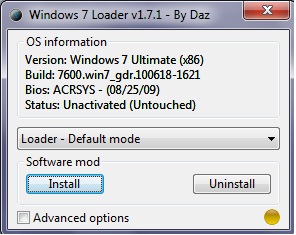
1. Double click on windows 7 loader (right click, open). It will appear the following dialog box:


2. Leave the default position and click on "install"
3. Take a few moments, then you will see demand for restart if the activation process is complete.
4. Select a restart!

After restarting Windows, you can check whether your windows is active or not, here's how:
 
* How to check the activation windows 7
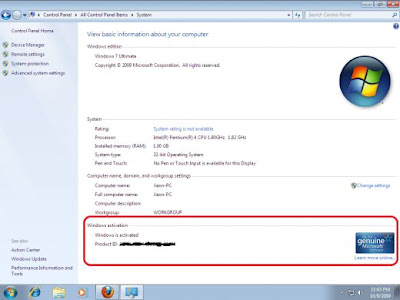
1. Click Start> right click on my computer> select properties
2. It will appear a window like the following picture:


3. If there is already a sign of "genuine" and it says "windows is activated", then you can smile because your windows 7 is already active.

Good luck!
Here's a link to windows 7 loader:

 
GOENS89 © 2011 Theme made with the special support of Maiahost for their cheap WordPress hosting services and free support.